
Getting Started
How to Set Up a Binance Anti-Phishing Code and Check Whether an Email Is Real
A Binance anti-phishing code is a short code you choose that appears in genuine Binance emails and SMS. Learn where to create or change it on the web and in the app, the character rules, and what to check when a message has no code.
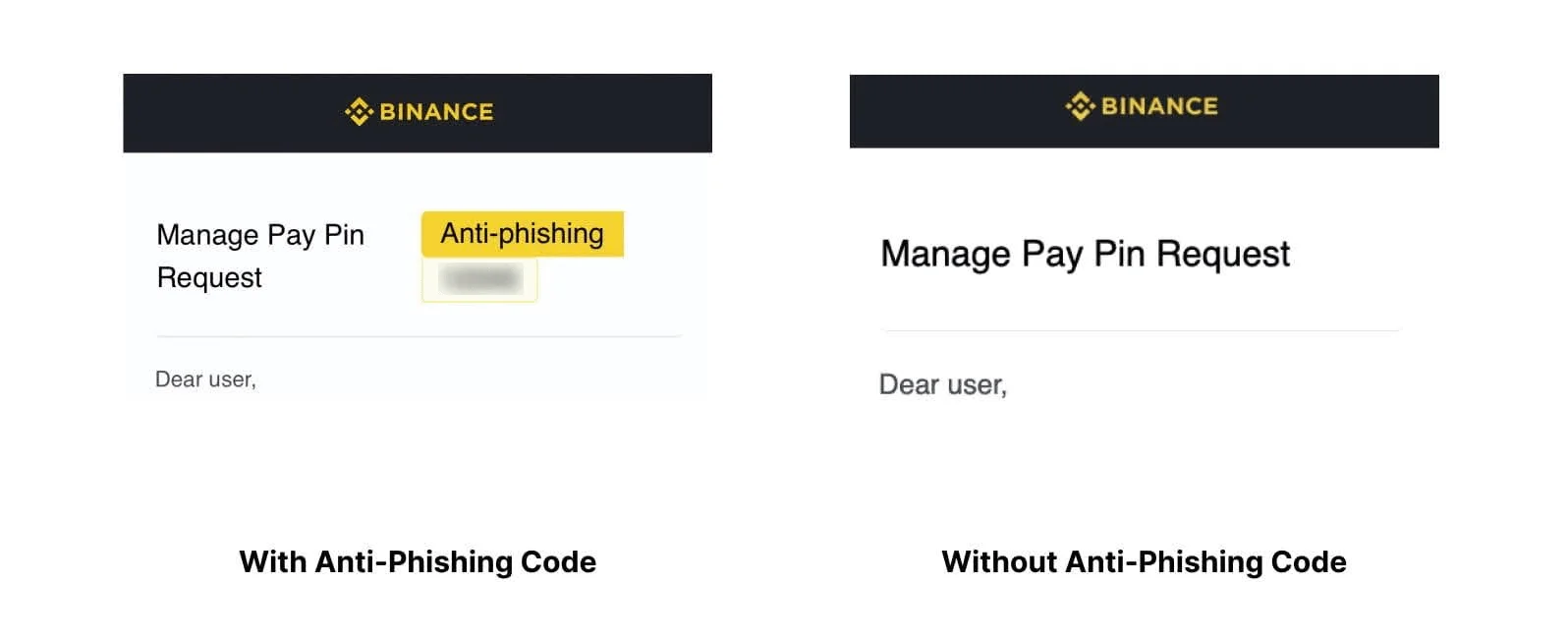
A Binance anti-phishing code is a short string of letters and numbers that you choose yourself. Once it is enabled, Binance's help center says the code is included in every genuine email and SMS it sends you. If a message that claims to come from Binance shows no code, or shows a different one, treat it as a possible phishing attempt. This guide covers where to create the code, the format rules, how to change it, and what the code can and cannot prove.
Example image from the Binance Help Center. It shows a demo email, not a real account.
Why set one up if you already use 2FA?
Two-factor authentication protects the login and withdrawals. It does not help you decide whether an email is real. Most phishing attacks try to get you to do something yourself: type your password and 2FA code into a fake login page, share a 2FA backup key, or download a fake "statement". Binance's own examples of phishing emails include a sender address on a lookalike domain (www--binance.com) and a fake login page that then asks for the 2FA backup key.
The display name of an email is easy to fake, and Binance warns that even a sender address that looks official can be spoofed. The anti-phishing code adds a check that a scammer who only knows your email address cannot pass. They do not know the code you picked.
Code format: what Binance accepts
According to the Binance FAQ on anti-phishing codes, the code must:
- be 6 to 8 characters long;
- include at least three of these four types: uppercase letters, lowercase letters, digits and underscores;
- contain no special characters other than the underscore.
Binance recommends a code that is hard to guess but easy for you to recognise. In practice, avoid your name, birthday or anything used as a password elsewhere. The create form itself says "this is not a password". It is a recognition mark, and you will see it in plain text in every message.
How to create the code on the Binance website
- Log in, hover over the Profile icon and click Account.
- Open Security, scroll to Advanced Security and click Enable next to Anti-Phishing Code.
- Click Create, enter your code and click Submit.
- Complete the security check with your registered 2FA method or passkey.
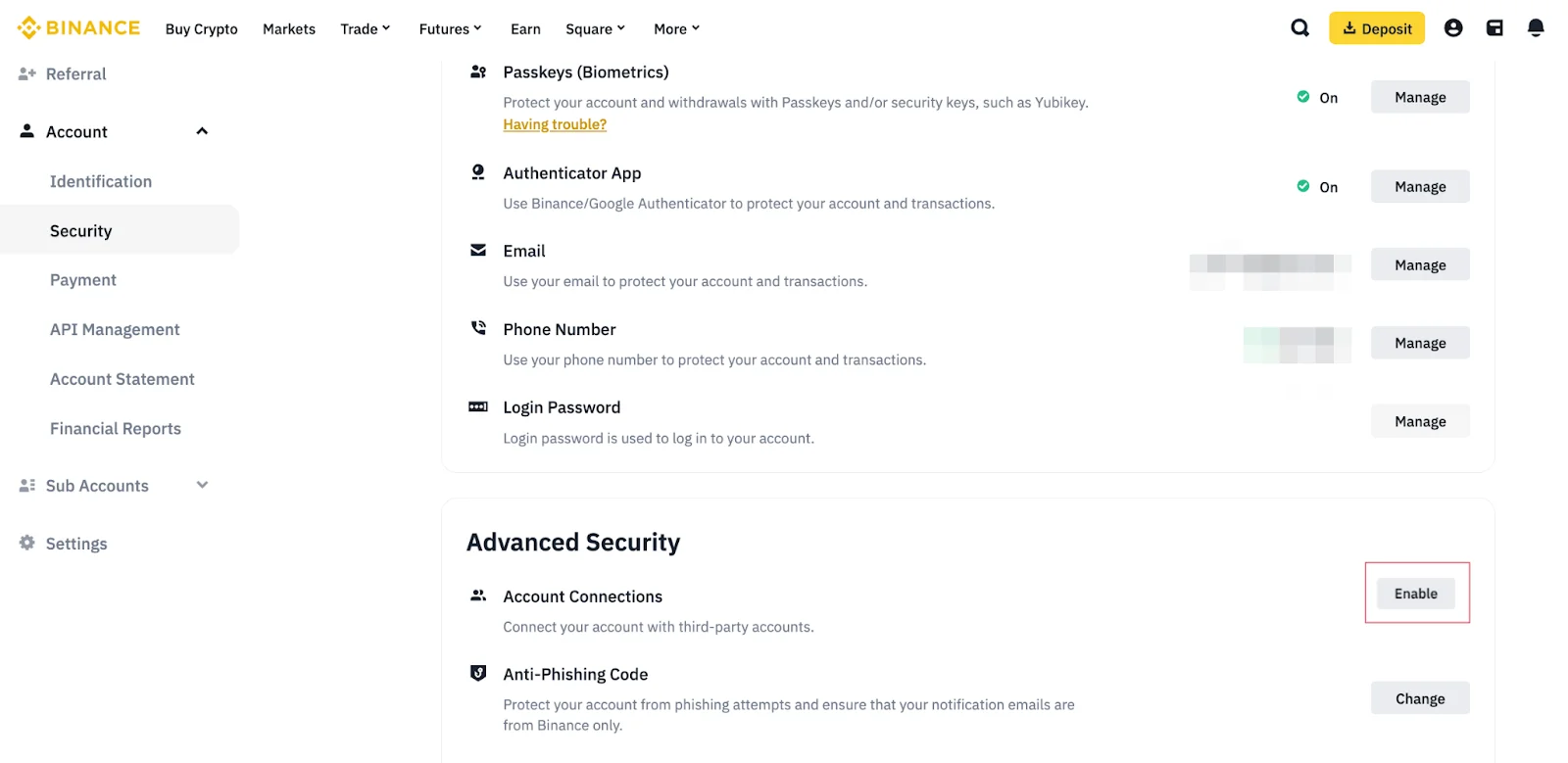
Help Center demo screenshot of the website's Security page. The Anti-Phishing Code row is at the bottom, under Advanced Security.
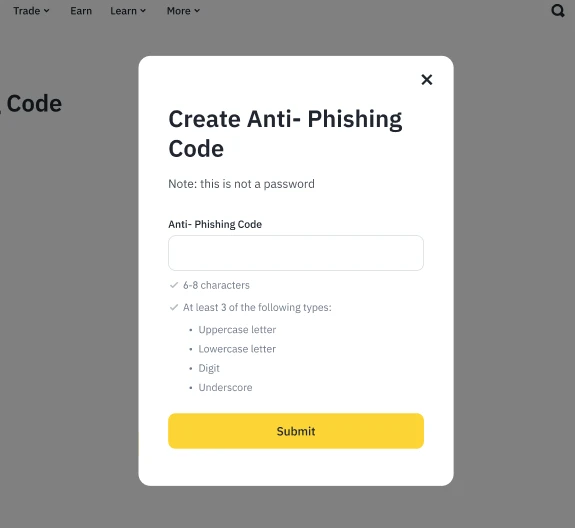
The create form lists the character rules beneath the input field (Binance Help Center example).
How to create it in the Binance app
- Open the menu, tap your profile to open Account Info, then select Security.
- Tap Anti-Phishing Code, then Create.
- Enter the code, tap Submit, and verify with your 2FA method or passkey.
Menu labels can differ by app version and region. If you cannot find the entry, search for "Anti-Phishing" inside the app rather than following a link someone sends you.
Changing the code later
Binance suggests updating the code regularly, and right away if you think it has leaked, for example after posting a screenshot of a Binance email. On the website, click Change next to Anti-Phishing Code, then Change Anti-Phishing Code. Enter the new code, confirm, and complete 2FA. In the app the path is Profile → Account Info → Security → Anti-Phishing Code → Change Anti-Phishing Code.
A message has no code: what to check next
The code only helps if you look for it every time. When an email or SMS mentions Binance, use this order:
- Look for your code. Missing or wrong means do not click anything in the message. Binance asks users to report such messages.
- Check the sender in Binance Verify. The official verification page lets you check whether a link, email address, phone number, Telegram account or other social media handle belongs to Binance. You do not need a Binance account to use it. A verified address with no code still deserves suspicion, because sender addresses can be spoofed.
- Open Binance yourself. Type the address or use the official app, and check whether the alert also appears in your account. If an email says a withdrawal is on hold, look at the transaction history directly. Our guide on finding where a Binance transfer is stuck explains how to read the real status and TxID.
- Ask through official support if you are still unsure. Binance's account security tips state that it will never call you or message you on WhatsApp or other social media.
What the code does not protect against
- Calls, chat apps and social media. The code is added to emails and SMS. A caller who claims to be "Binance support" has no code to show you.
- Fake websites you reach on your own. The code appears only in emails and SMS, so it cannot tell you whether a login page is real. A sponsored search result or a saved lookalike link can lead to a fake site. Check the address bar before you log in.
- A code that someone else has seen. If an attacker has access to your inbox, they can read the code and copy it into a fake email. Protect the email account with its own strong password and 2FA, and change the Binance code if you suspect a leak.
- Sending crypto to the wrong place. A real email can still be the start of a social-engineering scam. Limiting withdrawals to saved addresses adds a second barrier. See how to save a Binance withdrawal address and use the whitelist. Before any transfer, run the network and Memo checks in our Binance withdrawal guide.
Quick checklist
- Code created (6–8 characters, at least three character types, no special symbols) and kept private.
- Every Binance email or SMS checked for the exact code before you click.
- Unknown senders checked in Binance Verify, and links opened only by going to Binance yourself.
- Code changed after any suspected leak, and your email account secured with 2FA.
Sources: Binance Help Center, "What Is an Anti-Phishing Code and How to Set It up on Binance?" (last updated August 2026), "Examples of Phishing Emails", "What is Binance Verify?" and "Binance Account Security Tips". Checked on 20 October 2026. Menu names may vary by app version and region; follow what your own account shows.