
Getting Started
Binance Withdrawal Fees: Check Network Costs and Minimums Before Sending
Before sending crypto from Binance, match the recipient’s network, check the live withdrawal fee and minimum, and distinguish that charge from any trading fee.
Binance withdrawal fees are the amount shown when you send crypto from Binance to an external address. The amount depends on the coin and the selected network, and it can change with network conditions. Before withdrawing, check which network the recipient accepts, then read the current fee and minimum withdrawal amount for that same network. A low fee cannot make an incompatible network safe.
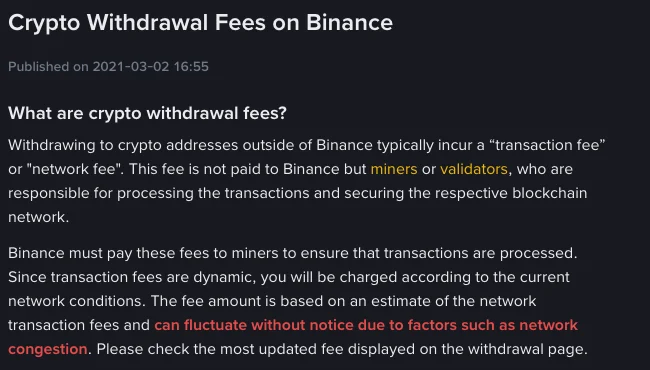
Binance's withdrawal fee explanation says the displayed fee can fluctuate without notice and directs users to the withdrawal page for the latest amount. The screenshot below shows that explanation as it appeared on 30 September 2026; it is a source for the rule, not a live fee quote.
Binance Support's public explanation, captured on 30 September 2026. View the current source.
Where can you check the fee before sending?
Binance provides a public deposit and withdrawal fee page. Use it to look up the coin and available networks. For the amount that applies to your own transaction, check the withdrawal form before confirmation: Binance says that form shows the current transaction fee and minimum withdrawal amount. If a network is suspended or unavailable for your account, do not assume a public listing means you can use it.
The useful comparison is coin + network + current fee + minimum, not just the coin name. USDT, for example, can exist on multiple networks. A fee displayed for one USDT network does not tell you the fee for another. Binance's withdrawal instructions say to choose the network supported by the destination and warn that using the wrong one can result in loss of funds.
Choose the receiving network before comparing prices
- On the receiving wallet or exchange, open its deposit details for the exact coin you intend to send. Note the network it accepts and copy the address from that screen.
- If the recipient shows a memo, tag or payment ID, copy that too. Binance's unsuccessful-withdrawal FAQ explains that a memo or tag can identify the recipient beyond the address.
- In Binance's withdrawal form, select the same coin and a network that the recipient explicitly supports. Compare fees only among compatible choices.
- Before confirmation, review the destination address, any required memo or tag, the quoted fee, the minimum, and the amount the form says the recipient will receive. Recheck the fee if you leave the form open for a while; the quote may change.
Do not choose a network solely because its name looks familiar or its fee is lowest. The recipient's stated support is the deciding check. For the full sequence, including the address and confirmation screens, see how to withdraw crypto from Binance.
Is the withdrawal fee a percentage?
Do not apply a single percentage to every withdrawal. Binance quotes a fee for the chosen coin and network, while that quoted amount can change as network conditions change. The minimum withdrawal amount is a separate rule: if your requested amount is below the minimum, the withdrawal cannot be submitted. Both values are shown in Binance's withdrawal flow, according to its fee FAQ.
To see why small withdrawals can feel expensive, divide the displayed fee by the amount you plan to send. As a purely arithmetic example, if a form hypothetically showed a 1 USDT fee, that would equal 1% of a 100 USDT withdrawal but 0.1% of a 1,000 USDT withdrawal. These are illustrative numbers, not Binance's current USDT fees. Check the form's actual fee and received amount rather than treating the example as a quote.
Why does a trade show another fee?
A trading fee belongs to an executed buy or sell. A withdrawal fee belongs to sending crypto out to an external address. Buying an asset and later withdrawing it can therefore involve both charges. Binance's fee structure lists trading and withdrawal fees separately. If you need to budget for the trade first, calculate Binance spot trading fees for a buy and sell using the rate and fee asset that apply to your account.
Moving a balance between wallets within Binance is a different action from sending crypto to an outside address. Check which action you are taking before using an external withdrawal fee as your estimate.
What if the withdrawal has already been submitted?
Keep the withdrawal record and any transaction ID Binance provides. The displayed fee is only one part of the transaction record; completion also depends on Binance processing, the selected network and the recipient's crediting process. If the transfer does not arrive, use the deposit and withdrawal status guide to identify which stage needs attention. Do not send the same amount again merely because the first transfer has not appeared at the destination.
Fees, minimums and network availability can change. Use the live Binance withdrawal form and the recipient's current deposit instructions for the final decision.