
Spot Trading
Binance Spot Fees (2026): What a Buy and Sell Cost and How to Check Your Rate
A simplified same-price 1,000 USDT spot buy and sell costs about 1.999 USDT in fees. Market buys can add spread or slippage; check your rate, actual fills and fee asset.
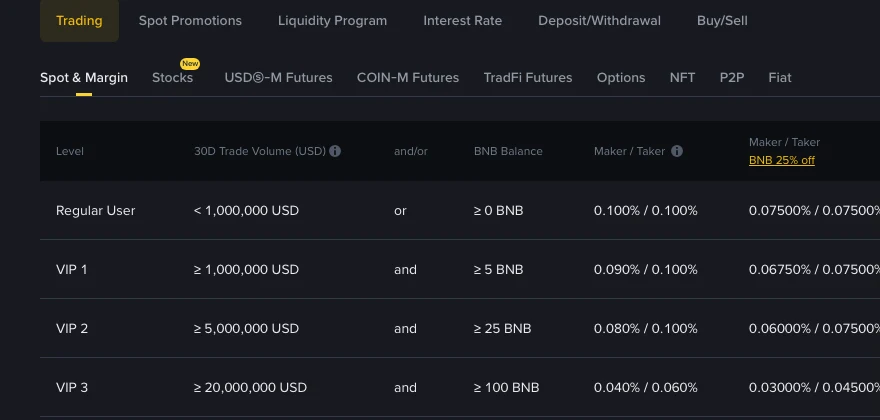
Binance spot trading fees are charged on each executed trade, so a buy and a later sell each have a cost. For a regular user on the standard spot schedule, Binance currently lists 0.100% maker and 0.100% taker. That makes a 1,000 USDT buy and a same-price sell cost close to 2 USDT in total. The detail that changes the calculation is which asset Binance deducts for each fill.
The rates were checked again on 11 October 2026; the screenshot below was captured on 28 September 2026. They describe the standard Spot & Margin table, not every pair, region or account. Check the live Binance spot fee schedule before trading; pair promotions and your VIP level can change the rate.
The Regular User row of Binance's public Spot & Margin fee table, captured on 28 September 2026. Source: Binance fee schedule.
How to find the rate for your own spot trade
Start with Binance's live fee schedule. Select Trading → Spot & Margin, then find your account's Regular User or VIP row. Read the Maker / Taker column for the way each fill executed. If you have enabled BNB fee payment and have an eligible BNB balance, use the separate BNB column. The page also shows separate USDC columns; check whether your pair is covered there instead of assuming the standard column applies.
Check the pair for a current promotion before calculating. A promoted rate can differ from the standard table, and a fiat trading pair has its own fee table. For an order that fills in parts, review each fill in Trade History: Binance says it shows the actual fee and maker or taker role. The rate displayed before execution is only an estimate. Binance's spot fee guide explains that the final charge depends on the completed trade.
Before a market buy, check the price as well as the fee
A market buy in BTC/USDT matches available sell orders. The last traded price on the screen is not a promised purchase price: Binance's market-order guide says the average filled price can be above the displayed price for a buy. If the amount you want is larger than the quantity offered at the best ask, the order can match sellers at more than one price. The price and visible quantities can also change before your order reaches the book.
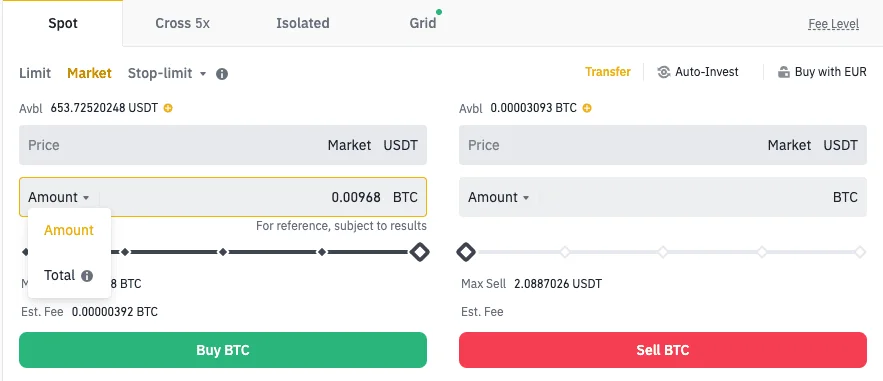
Binance's market-order help page uses this product screenshot to show the Market form. Its example balances and estimated fee are illustrative, not a live quote or a completed trade; the current interface may differ.
For a purchase, the best ask is the lowest visible sell offer, while the best bid is the highest visible buy offer. Their difference is the bid–ask spread. Slippage describes a difference between an expected and an executed price. These are price comparisons, not separate fee lines. Their measurements can overlap, so do not add a full spread and a slippage estimate to the final execution price as if Binance billed each one separately.
Before submitting a market buy, confirm the pair and spending amount, inspect the current ask side of the order book, and use your applicable fee rate to estimate the fee. Treat the displayed quantity and price as a snapshot, not a guarantee. If you need a maximum buy price, a limit order sets one, but it may fill partly or not at all. After execution, compare the average price in Order History with the fee amount and fee asset for each fill in Trade History. Binance says the trading screen's estimated fee is only a reference; the Spot fee guide points to Trade History for the actual charge.
For a buy charged in BTC, net BTC received = BTC from all fills − BTC-denominated fees. If eligible fees were paid in BNB, read the BNB deduction separately rather than subtracting it from BTC. To compare another route for the same spending amount, compare a Spot purchase with a Binance Convert quote using the net BTC received, not only the two screens' headline prices.
Which asset pays the fee on a spot buy or sell?
Without BNB fee payment, Binance says the fee is taken from the asset you receive. On an ETH/USDT buy, you receive ETH, so the fee is in ETH. On a sell, you receive USDT, so the fee is in USDT. Binance's spot fee calculation guide gives this rule and says the final fee is based on the executed trade, not merely the estimate shown before a fill.
A useful rule is received amount × applicable fee rate. Multiplying the USDT trade value by the rate gives a convenient USDT equivalent for budgeting, but it does not mean every fee is deducted in USDT.
Worked example: buy ETH, then sell what you received
Assume a 0.100% fee, an ETH/USDT price of 2,500 USDT per ETH, no BNB payment, and no price change or spread. These are arithmetic assumptions, not a claim about today's market price or a real trade.
| Step | Calculation | What you hold afterward |
|---|---|---|
| Buy with 1,000 USDT | 1,000 ÷ 2,500 = 0.4 ETH before the fee; 0.4 × 0.100% = 0.0004 ETH fee | 0.3996 ETH |
| Sell all 0.3996 ETH at the same price | 0.3996 × 2,500 = 999 USDT before the fee; 999 × 0.100% = 0.999 USDT fee | 998.001 USDT |
You started with 1,000 USDT and end with 998.001 USDT: a 1.999 USDT difference caused by the two fees in this simplified same-price example. The buy fee was actually 0.0004 ETH; its value at the assumed price was 1 USDT. A real round trip also faces the bid–ask spread and possibly slippage, so its total trading cost can be higher.
If you sell a fixed 0.4 ETH instead of only the 0.3996 ETH received, you must supply the missing 0.0004 ETH from another balance. That is why a quick “1 USDT each way” estimate is useful for planning but not an exact account-balance calculation.
Why your own rate may differ
The public fee table separates maker and taker rates by VIP level. At the current regular tier, the two standard spot rates are equal; at some higher tiers they differ. A limit order is not automatically a maker fill: if it immediately matches an existing order, it takes liquidity. See why a Binance limit order can incur a taker fee before assuming your order type gives a lower rate.
Binance's standard table also shows 0.07500% for regular-user maker and taker fills when eligible fees are paid in BNB, a 25% reduction from 0.100%. In that case, the fee is deducted in BNB rather than in the asset received; BNB's price and the available balance matter. The conditions and trade-offs are covered in our guide to paying Binance fees with BNB. Do not apply the discounted figure unless it is active for your trade.
VIP qualifications, promotional pairs and special fee columns can change the result. The fee table even has separate USDC columns, so do not carry the standard example into every quote asset. If your account has a different tier, use its actual maker or taker rate from the live table.
Check a charge against your trade history
Use Binance's official Trade History after the fill and compare the executed amount, fee rate, fee amount and fee asset. For a buy, calculate the expected fee in the asset received; for a sell, calculate it in the quote asset received. If you paid in BNB, compare the BNB deduction and the discounted rate instead. Binance's spot fee guide confirms that Trade History shows the fee charged for each trade.
If the result differs from your estimate, check the actual fill amount and price, your VIP tier, maker or taker execution, BNB payment, and any pair-specific promotion. The fee shown before execution is an estimate; the filled trade is the record to reconcile.
This is an explanation of trading costs, not an investment recommendation. Rates and eligibility can change; the linked Binance pages and your own trade record take precedence over this dated example.