
Futures
Binance Reduce Only Order Rejected? Causes and Safe Closing Checks
If a Binance Futures Reduce Only exit is rejected or canceled, check the live position, order side, quantity and competing exits before trying again. This guide explains the rule and the One-way versus Hedge Mode difference.
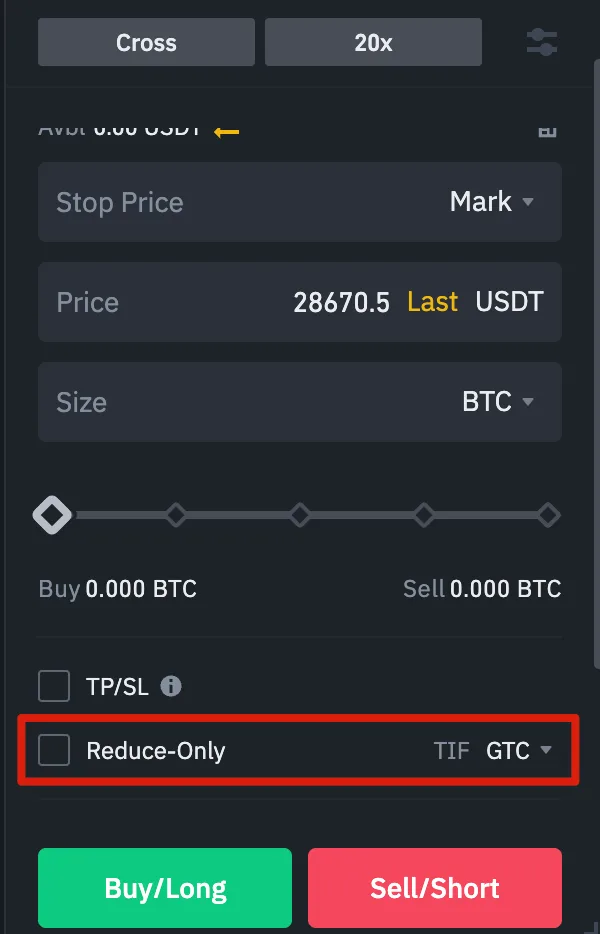
A Binance Reduce Only order can close or shrink a Futures position without opening the opposite position. If Binance rejects or cancels your exit, check the position that exists now before placing another order. The cause may be the order side, its size, another open exit or the account's position mode. Reduce Only limits what an order can do; it does not guarantee that Binance will accept or fill it.
Binance's Futures guide shows this older order-entry screen. The placement of the control may differ in today's web or app interface; use your current position and order screen for the final check.
What does Reduce Only prevent?
In One-way Mode, a contract has one net position. A sell reduces a long, and a buy reduces a short. Binance's Futures guide says a Reduce-Only order can only decrease that position. Suppose you hold a 0.5 BTC long. Without a reducing constraint, a fully filled 0.8 BTC sell could close the long and leave a 0.3 BTC short. With Reduce Only, the order cannot create that short. These figures explain the mechanism; they are not a suggested order size. An oversized exit may be rejected rather than automatically trimmed.
| Live position | Reducing order side | Side to question |
|---|---|---|
| Long | Sell | Buy, which adds to the long |
| Short | Buy | Sell, which adds to the short |
| No position | None | Any new Reduce-Only exit has nothing to reduce |
This safeguard is useful when a take-profit, stop and manual exit could overlap. After a partial fill or manual close, the remaining position may be smaller than an old exit order. Check both Positions and Open Orders for the same contract before sending another exit. For a broader explanation of net positions and order direction, see our Binance Futures guide.
Why was my Reduce Only order rejected or canceled?
Binance's failed-orders FAQ identifies these Reduce-Only cases:
| What you find | Why it matters | What to check next |
|---|---|---|
| The order is on the same side as the position | It would add exposure instead of reducing it | Recheck whether the live position is long or short and choose the opposing order side |
| The closing quantity exceeds the live position | Binance says an oversized opposite-side order can fail its margin check | Read the current remaining quantity; do not reuse a size copied before a partial fill |
| Several Reduce-Only limit exits compete | A more aggressive new exit can cause a lower-priority old exit to be canceled | Compare open exits for the same contract and their combined quantities |
For the last case, Binance gives an example: a 100-unit long has a 50-unit Reduce-Only sell at 1,000 USDT. A new 60-unit sell at 999 USDT is more aggressive, and the older order is canceled because the two exits together exceed the remaining position. This is an illustration of order priority, not a price or position recommendation. The FAQ also describes other possible Futures order failures, including position limits, minimum notional rules and high traffic. Read the actual error message before assuming Reduce Only caused the failure.
If the interface says "Reduce-only order failed", Binance's FAQ suggests checking or canceling conflicting open orders. First note what protection those orders provide. After canceling one, read the live position again and enter a fresh quantity; a previously planned exit may no longer match the position. A rejected order has not closed the trade, and an unfilled limit exit leaves exposure in place. Our liquidation-price explanation explains why relying on an unfilled exit is risky.
A short closing checklist
- Open the Positions view and confirm the contract, position mode, direction and remaining quantity. If the position is already zero, stop: there is nothing for Reduce Only to close.
- Review Open Orders for that contract, including take-profit and stop orders. Check whether another exit has already filled or is competing for the same remaining quantity.
- Select the opposite order side: sell to reduce a long, buy to reduce a short. Enter a quantity based on the position shown now, and select Reduce Only where the current interface offers it.
- Read the confirmation and any rejection message. If accepted, verify the order status and then the resulting position. A submitted limit order is not the same as a filled exit.
The choice between a limit and market-style exit also changes execution and price risk. Reduce Only itself does not set a trigger, guarantee a fill or remove slippage.
Why is the checkbox missing in Hedge Mode?
Binance's Hedge Mode FAQ says that mode can hold separate long and short sides for one contract. Its USDⓈ-M order API documentation says the reduceOnly parameter cannot be sent in Hedge Mode; orders use an explicit position side. Web and app controls may present closing actions differently. Check the mode and the side being closed rather than assuming an absent checkbox means the order is unprotected. Our One-way versus Hedge Mode guide explains the two position models.
Sources checked 6 October 2026. Binance can change its interface and order rules. Verify the live position, order message and official help for your account before acting. This article explains order mechanics, not an investment strategy.