
Futures
Binance Funding Rate: Who Pays, How Much, and When?
See who pays Binance Futures funding, calculate a payment from position notional, and check the live rate and settlement interval for your contract.
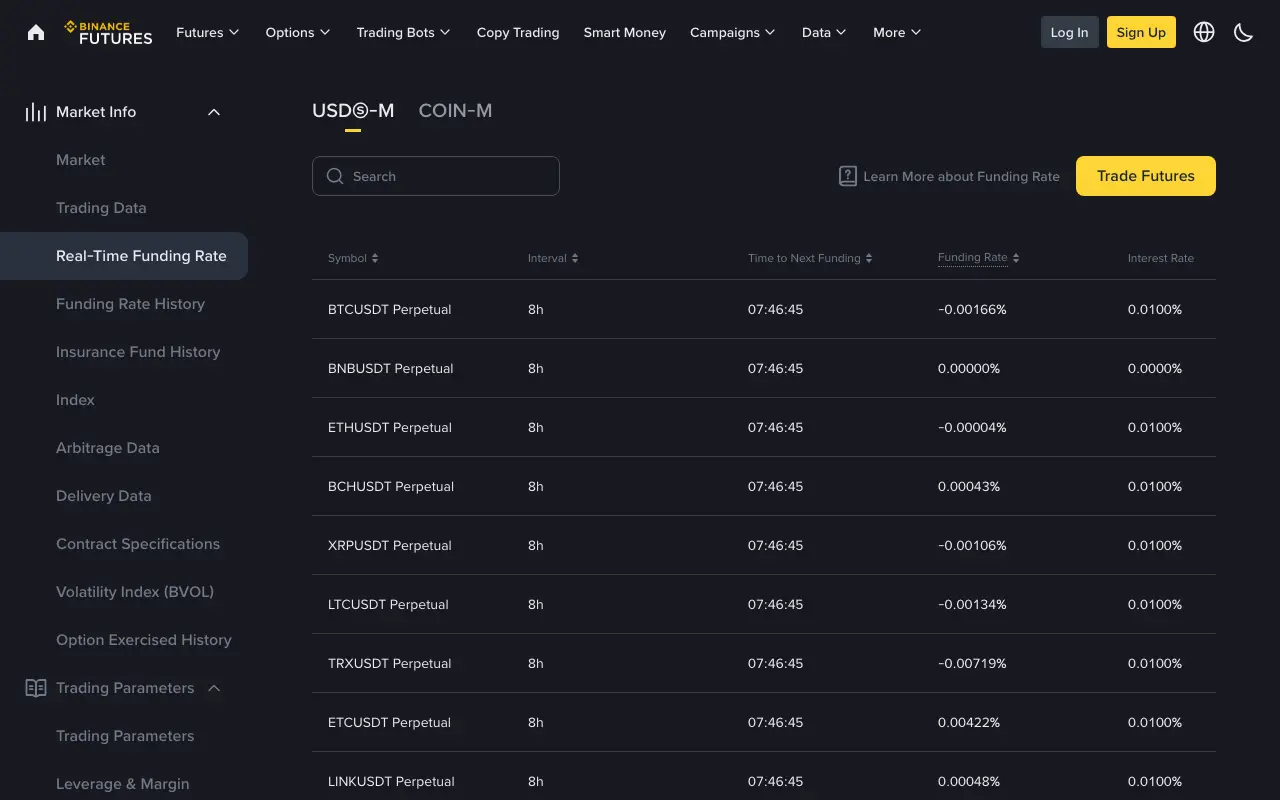
A Binance Futures funding rate tells you whether a perpetual position may pay or receive a funding payment at the next settlement. A positive rate means longs pay shorts; a negative rate means shorts pay longs. The payment depends on your position's notional value, not just the margin you deposited. Check the rate and the countdown for the specific contract before estimating a cost: both the rate and the settlement interval can change.
Binance's public real-time funding table, captured on 8 October 2026. The figures in the screenshot are a snapshot, not rates to use for a future trade.
Who pays when the rate is positive or negative?
| Rate at settlement | Long position | Short position |
|---|---|---|
| Positive | Pays funding | Receives funding |
| Negative | Receives funding | Pays funding |
| Zero | No funding payment from the rate | No funding payment from the rate |
Funding is a transfer between holders of opposite perpetual positions. Binance's Futures funding FAQ says Binance facilitates the transfer without charging a fee on that payment. It differs from the commission charged when an order executes. If you are adding up the cost of opening, holding and closing a position, use our guide to Binance Futures trading fees and funding to keep those charges separate.
Receiving funding does not make a trade profitable. The position can lose more from price movement, commissions and slippage than it receives. The sign of the rate tells you the payment direction at settlement; it is not a prediction of the next price move.
How do you calculate one funding payment?
For a USDⓈ-M perpetual contract, the useful estimate is position notional at settlement × settled funding rate. Binance's fee explanation gives this relationship, while its funding FAQ defines nominal value using mark price and contract size. Use the contract's actual value and rate when checking a real payment.
Suppose a position is worth 20,000 USDT at settlement and the rate is +0.01%. Then 20,000 × 0.0001 = 2 USDT: the long pays about 2 USDT and the short receives about 2 USDT. These are round numbers to show the arithmetic, not a live rate or trade suggestion. If the rate were −0.01%, the direction would reverse.
Do not multiply the funding rate by leverage again. Funding already applies to the position's notional value. For example, if that 20,000 USDT position used roughly 2,000 USDT of initial margin at 10×, a 2 USDT payment would be 0.1% of the margin in this simplified illustration. That comparison explains why funding can feel large relative to posted margin; actual margin and liquidation risk depend on the contract and account. For the difference between position value, PnL and margin-based returns, see our Futures PnL and ROE examples.
When is funding charged?
Binance's Futures fee FAQ says eight-hour settlement is typical, but the interval depends on the contract. The funding FAQ also describes adjustments in some conditions. Read the Interval and Time to Next Funding columns for your exact contract instead of assuming every market settles three times a day.
A position generally pays or receives funding only if it remains open at the settlement. The rate shown before then is an estimate, so a screenshot from earlier in the interval cannot establish the final payment. Closing only to avoid funding can itself incur commission, spread and slippage; compare those costs and the remaining position risk before making a decision. If funding reduces available balance or position margin, it can also affect liquidation risk; our margin-ratio explanation shows why that balance matters.
Where can you check the rate and history?
- Confirm whether your contract is USDⓈ-M or COIN-M and note its exact symbol.
- On Binance Futures, open Data → Futures Data → Real-Time Funding Rate and find that symbol. Read its interval, countdown and displayed rate together. The public table above shows these fields; your current screen is the source for a current estimate.
- Open Funding Rate History to compare completed settlements. If you need to reconcile an amount you personally paid or received, use your own Futures transaction record for the actual entry; a public rate table cannot show your position size or account payment.
The navigation to real-time and historical rates is described in Binance's funding FAQ. Interface labels may change. Check the contract and settlement time again if the number you calculated differs from the account record.
Sources and public screenshot checked on 8 October 2026. Rates, intervals and interfaces can change. This explanation is for understanding a funding charge, not a trading recommendation.